
Vix Note
Vix Note is the local notebook workspace for Vix.cpp.
It gives a C++ project a place where explanation, executable code, small Reply cells, HTML previews, and captured output can live together in one readable .vixnote file. The format stays close to Markdown, so a note can still be opened, reviewed, and versioned like a normal text document, while Vix provides the local runtime needed to execute the cells from the notebook UI.
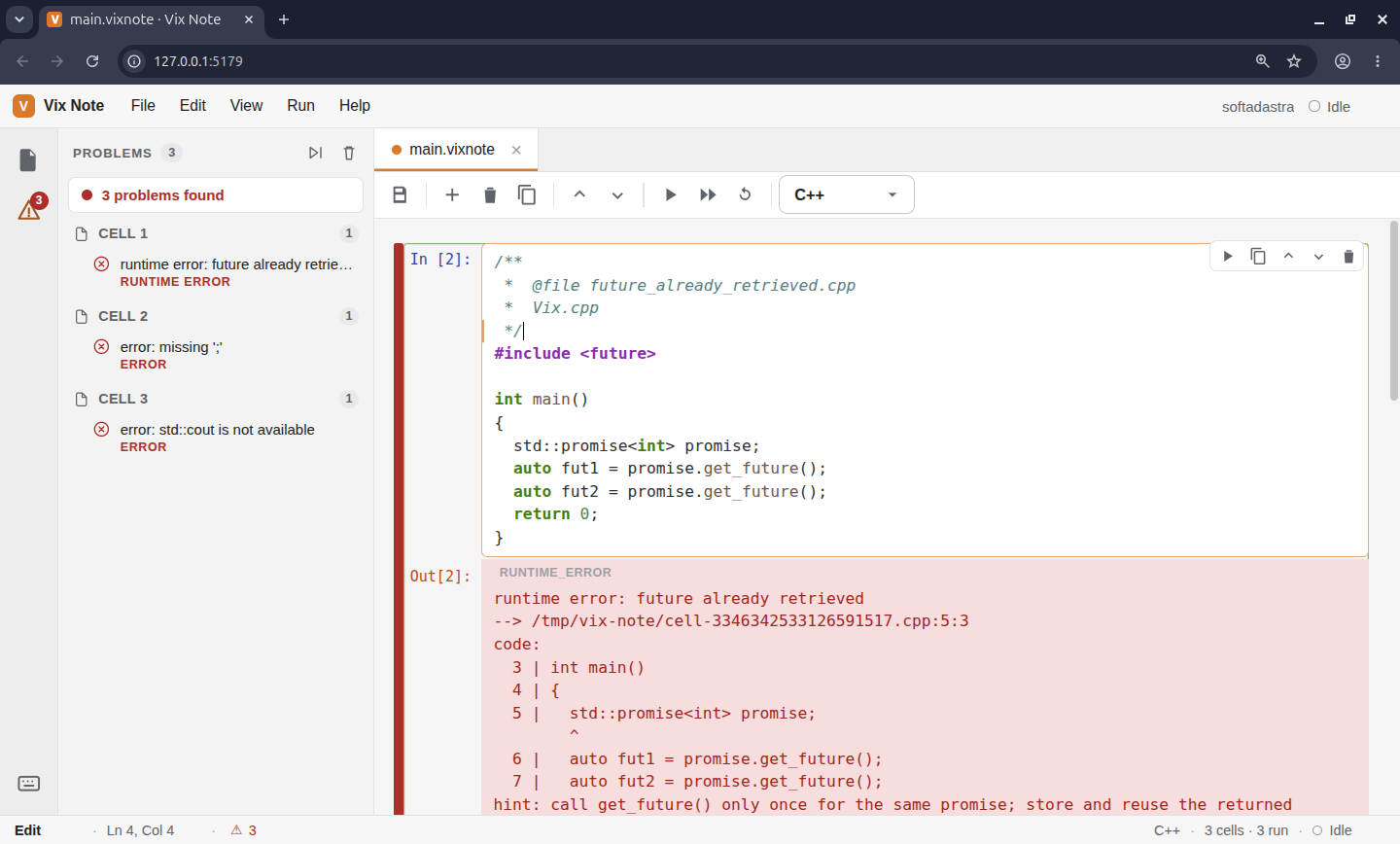
vix noteA note is useful when code needs to be explained as it runs. It can be used for learning material, project notes, small technical investigations, examples, tutorials, or internal documentation that benefits from keeping the source and the result close to each other.
Why Vix Note exists
C++ examples often end up split between documentation, source files, terminal output, and screenshots. That makes a lesson or technical note harder to maintain because the explanation and the code can drift apart. Vix Note keeps the structure simple: a document is made of cells, some cells explain, some cells execute, and the output appears under the code that produced it.
The important part is that Vix Note does not create a separate C++ world. C++ cells are executed through the normal Vix workflow. When a notebook runs a C++ cell, the runtime writes the cell to a temporary source file and delegates execution to vix run. This keeps notebook execution aligned with the same CLI behavior developers already use outside the notebook.
Start a note
Start an empty local notebook workspace from the current directory:
vix noteOpen an existing note:
vix note lessons/cpp-basics.vixnoteUse another port when the default local port is already busy:
vix note lessons/cpp-basics.vixnote --port 5180When the command starts, Vix Note serves a local UI in the browser. The UI is local to the machine, loads the note document, and exposes actions for editing and running cells.
The .vixnote format
A .vixnote file is a Markdown-compatible document with Vix Note cell metadata. Markdown text stays as normal Markdown. Executable and renderable cells are written as fenced blocks.
<!-- vixnote:cell id="intro" kind="markdown" -->
# C++ Basics
This note keeps the explanation, code, and output together.
<!-- vixnote:cell id="hello-cpp" kind="cpp" title="Hello C++" -->
The metadata comments preserve stable cell ids and cell type ids across save and load cycles. Built-in documents commonly use Markdown, C++, Reply, and HTML, but extension packages can add additional text-based cell types such as Python. The file remains readable as text, which matters for source control and long-term maintenance.

## Cell types

Vix Note ships with four built-in cell types.

```txt id="plaf63"
markdown   explanation and normal documentation
cpp        C++ code executed through vix run
reply      small Reply expressions evaluated by the embedded Reply runtime
html raw HTML rendered inside the note UIExtension packages can add more cell types through extensions.note metadata. A Python runtime, for example, can contribute a python cell type after it is installed globally with vix install -g.
Markdown and HTML cells are rendered by the UI. C++ and Reply cells are executable. Extension cell types are executable when their descriptor declares executable: true and their runtime is available. When executable cells run, Vix Note stores their outputs in the current runtime session so the UI can display stdout, errors, compiler diagnostics, hints, debug information, or raw logs near the cell.
C++ cells
C++ cells are for normal C++ examples. In Vix Note documentation and lessons, std::cout is the right default because the notebook is often used to teach or explain C++ itself.
<!-- vixnote:cell id="vector-cpp" kind="cpp" title="vector example" -->

```cpp
#include <iostream>
#include <vector>

int main()
{
  std::vector<int> values{2, 4, 6};

  values.push_back(8);

  for (int value : values)
  {
    std::cout << value << std::endl;
  }

  return 0;
}
```
The cell runner does not replace the compiler workflow. It prepares a temporary C++ file and asks the Vix CLI to run it. This gives the notebook a clean execution model without creating a second build system inside the note module.

## Reply cells

Reply cells are small interactive cells for quick values, simple calculations, structured data, and runtime helpers. They are useful when a note needs to explain an idea without requiring a full C++ program.

```md id="fvfysu"
<!-- vixnote:cell id="quick-math" kind="reply" title="Quick math" -->
```reply
x = 1 + 2 * 3
println("x =", x)
Reply cells run through the embedded Reply runtime used by Vix Note. They are meant for short notebook interactions. For a full terminal session, use `vix repl`.

## HTML cells

HTML cells are rendered directly by the note UI. They are useful for small visual blocks inside a lesson, such as a diagram placeholder, a styled explanation, or a compact preview.

```md id="nxqy5m"
<!-- vixnote:cell id="html-preview" kind="html" title="HTML preview" -->
```html
<section style="padding: 16px; border: 1px solid #e5e7eb; border-radius: 12px;">
  <h2 style="margin-top: 0;">Vix Note</h2>
  <p>This block is rendered inside the local notebook workspace.</p>
</section>
HTML cells should stay focused. They help explain something visually, but the note should still remain readable as a text document.

## Project-aware execution

When a note is opened from inside a Vix or C++ project, Vix Note can detect the surrounding project context. The detector looks for project markers such as `vix.app`, `vix.json`, `.vix`, `CMakeLists.txt`, or `.git`, then prepares a context with the project root, working directory, manifest path, dependency directory, and include paths.

This matters when a notebook is used inside a real project. A C++ cell may need project headers or registry dependencies. In project-aware mode, Vix Note can run cells from the detected project root instead of treating the note as an isolated temporary file.

## Local UI

The local UI is served by the Vix Note server. It provides the browser workspace, static assets, document loading, cell execution, and document updates.

The server exposes routes used by the UI, including:

```txt id="q4xz84"
/                   local Vix Note UI
/api/document       current document state
/api/cells/<i>/run  run one cell
/api/run-all run executable cells in orderMost users do not need to call these routes directly. They exist so the UI can keep the browser state and the note runtime connected while the server stays local.
Export a note
Vix Note can export a document to standalone HTML.
vix note export lessons/cpp-basics.vixnote --out cpp-basics.htmlExport without runtime outputs:
vix note export lessons/cpp-basics.vixnote --out cpp-basics.html --no-outputsExport is for read-only sharing. It renders the current document state, source cells, and optional outputs. It does not execute cells during export. Run the cells first when the exported document should include fresh output.
Public API
The module also exposes a C++ API through the umbrella header:
#include <vix/note/note.hpp>The public API gives access to the document model, parser, storage helpers, runtime kernel, project detector, local server facade, and HTML exporter.
#include <vix/note/note.hpp>

int main()
{
  vix::note::NoteDocument document("C++ Basics");

  document.add_markdown("# C++ Basics");
  document.add_cpp(R"(#include <iostream>

int main()
{
  std::cout << "Hello from Vix Note" << std::endl;
  return 0;
})");

  vix::note::NoteKernel kernel(document);
  auto result = kernel.run_executable_cells();

  return result.ok ? 0 : 1;
}The API is useful when Vix Note is embedded into another local tool, tested directly, or used to build workflows around .vixnote documents. For normal writing and learning workflows, the CLI remains the main entry point.
Typical workflow
A normal Vix Note workflow starts with a local note, then runs cells as the explanation evolves.
vix note lessons/cpp-basics.vixnoteAfter the note is ready, export it:
vix note export lessons/cpp-basics.vixnote --out cpp-basics.htmlThe source file remains a readable .vixnote document, while the exported HTML can be shared as a static lesson or archived as documentation.
Next step
Continue with the quick start guide to create a small .vixnote file, open it in the local UI, run a C++ cell, and export the result.